Project settings
Open Project settings in the Project panel.
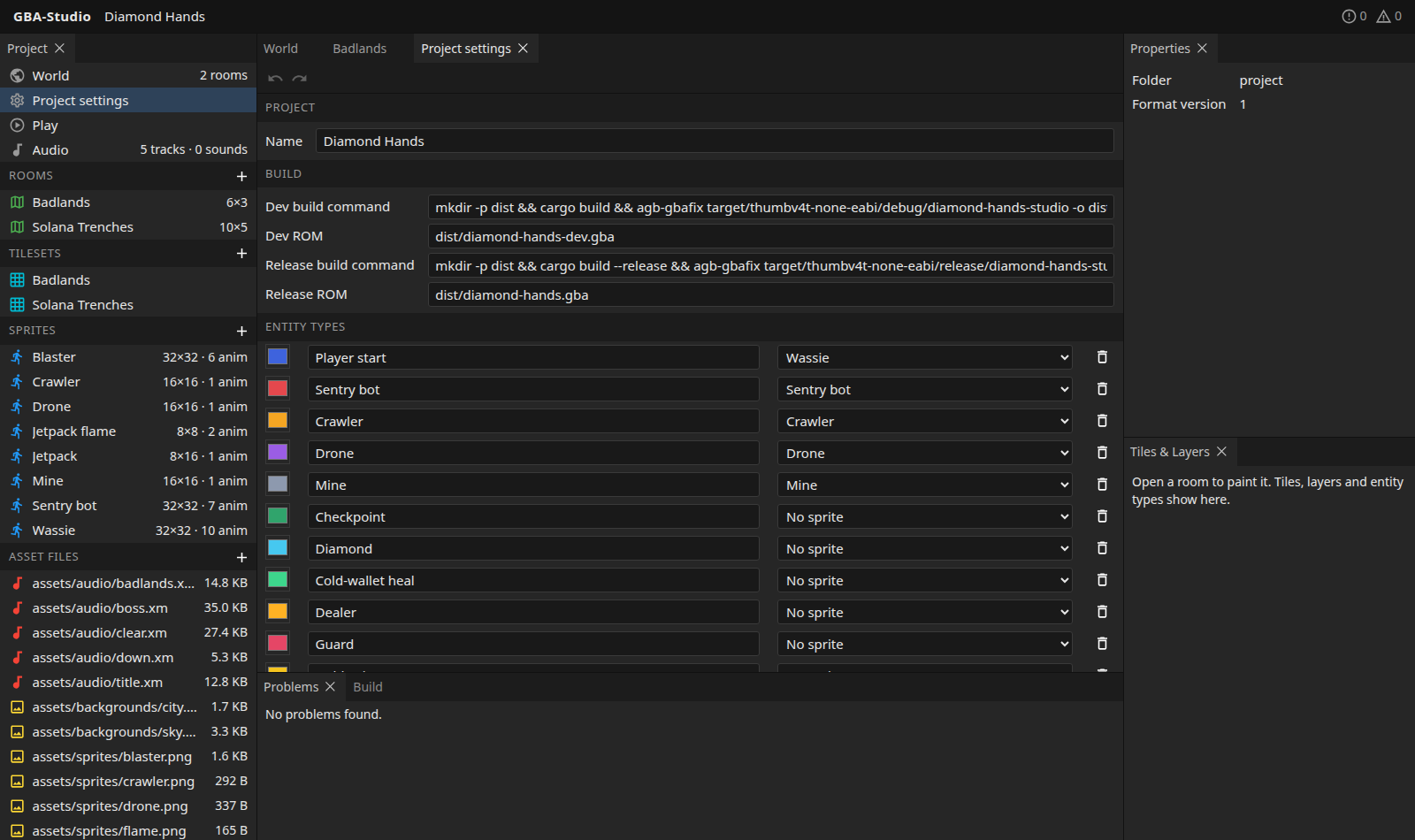
Project and build
| Field | Meaning |
|---|---|
| Name | The project name shown in the top bar. |
| Dev build command | The shell command that makes the dev ROM, run by Build dev. |
| Dev ROM | Where that command writes the ROM, relative to the game folder. |
| Release build command | The command for Build release. |
| Release ROM | Where the release ROM is written. |
The Play panel plays the ROM named here once it exists. See Build and Play.
Entity types
An entity is a thing placed in a room: a player start, an enemy, a pickup. Its type is defined here, and each row has:
- a colour, used on the map when the type has no sprite;
- a name;
- a sprite, or "No sprite";
- a bin to delete the type.
Use the + at the end of the list to add a type. Types can be added, renamed, recoloured and given a sprite here. Their typed properties (integer, boolean, text or one of a list) and the project's collision classes are defined in studio/project.json, not yet in the interface; see the project format.
Adding a collectible
A collectible is an entity type with a sprite and an integer value property. To add another kind (a ruby, a key): import its PNG as a sprite, add the entity type here, give it a value in studio/project.json, and place it in rooms with the entities tool. No Rust changes are needed in the sample game, which takes any such entity the hero touches.